
EN
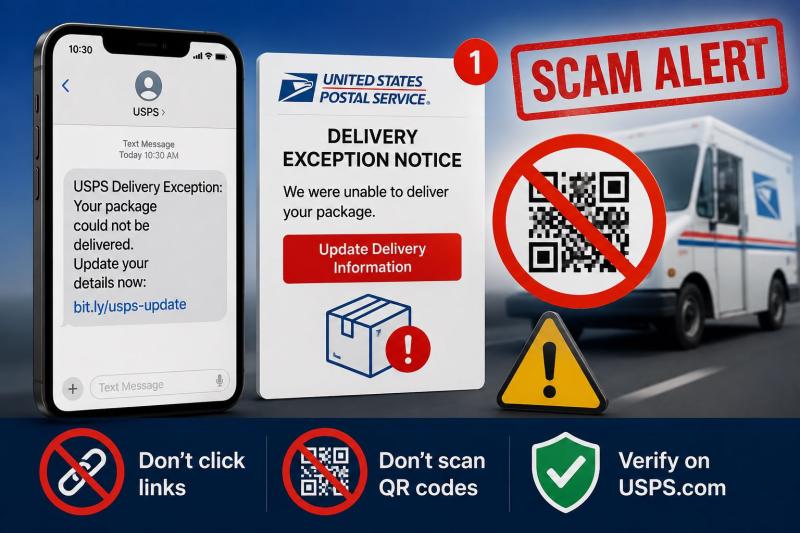
Have you received a text message or email claiming that your USPS package could not be delivered because of a delivery exception? If so, be careful. These messages are part of a widespread phishing scam designed to steal your personal information, login details, or credit card information.
Scammers continue to send fake USPS notifications that look convincing. They often claim there is a problem with your package and urge you to click a link, scan a QR code, or provide updated delivery information. However, these messages are not from the United States Postal Service (USPS).
USPS does not send unsolicited text messages asking you to pay fees, provide personal information, or release a package. If you receive such a message, it is almost certainly a scam.
The scam usually starts with an unexpected text message or email that appears to come from USPS. It may claim that:
The message usually includes a link or QR code that directs you to a fake website designed to look like the official USPS website. Victims are encouraged to click the link or scan the QR code to update their address, pay a small delivery fee, or reschedule delivery. The fake website then attempts to steal personal information, login credentials, or credit card details. In many cases, scammers use this information for identity theft or financial fraud.
Below are two examples of scam messages that have been reported.
Example 1:
"USPS® - Delivery Exception: Gate / Access Code Required
Your carrier was unable to access your delivery location due to a locked gate, security entrance, or restricted community access.
Your package has been returned to the USPS carrier facility and will be held pending updated access instructions.
Please provide your gate code or access instructions within 24 hours.
***link redacted for safety***
Reply "Y" to open the access instruction form. If the page fails, copy and open in Safari.
Delivery Access Options:
Provide Gate / Entry Code
Provide Contact Number for
Carrier
Redirect to Alternate Address
Hold at Post Office
Packages without updated access will be returned to sender after [Date]."
Example 2:
"USPS Delivery Exception Notice
We regret to inform you that a package addressed to your location could not be delivered due to the following reason:
Delivery Failed - No Authorized Tracking ending in 6924
Our courier attempted to deliver your parcel on the scheduled date but was unable to complete the delivery. This may have occurred because the shipping address provided was incomplete, incorrect, or no authorized person was available to accept the package at the time of delivery.
Immediate Action Required
To avoid your package being returned to the sender or incurring additional storage fees, you must update your delivery preferences or reschedule delivery within 48 hours.
Re-schedule Delivery / Update Address
Click Here to Fix Delivery and Resume Shipment
***link redacted for safety***
Please note: Failure to take action within the specified timeframe will result in your package being returned to the original sender, and you may be subject to a return shipping fee.
Need Help?
For assistance, contact USPS Customer Service at ***phone number removed for safety*** or visit your local post office.
Thank you for choosing USPS.
United States Postal Service
Official Communication - Do Not Reply"
Although these messages may appear genuine, there are several warning signs.
These are common tactics used by phishing scammers to pressure people into acting without thinking.
USPS does send tracking notifications, but only in limited situations. If you signed up for USPS Informed Delivery, you may receive legitimate emails or texts based on your notification preferences.
For example, you may receive legitimate text or email updates if you signed up for USPS Text Tracking or enrolled in USPS Informed Delivery. Even then, USPS does not send unsolicited messages asking for payment, personal information, or credit card details to release a package. USPS also does not charge a fee simply to redeliver a package.
If you receive a delivery exception message, the first thing you need to do is not to trust the link in the message.
Instead, what you can do are:
If you signed up for USPS Text Tracking, verify any notifications through your official USPS account.
If you receive one of these scam texts or emails:
If it is a text message:
If it is an email:
Forward the suspicious email to spam@uspis.gov.
If you already clicked the link or entered information:
The USPS Delivery Exception Notice scam is another variation of the well known USPS phishing scam. In this type of phishing attack, scammers send fake emails and text messages that appear to come from USPS. They use realistic looking delivery notices, fake delivery problems, and urgent deadlines to trick people into clicking malicious links and revealing personal, financial, or login information.
Whenever you receive an unexpected USPS delivery email or text message asking you to click a link, scan a QR code, update your address, or pay a fee, treat it with caution. Instead of using the link in the message, visit the official USPS website or use the USPS Mobile App to check your package status. Taking a few extra moments to verify the information through official channels can help protect you from phishing scams and identity theft.
This article has been written by a Scam Fighter Contributor, De-Reviews.com Team. If you believe the article above contains inaccuracies or needs to include relevant information, please contact ScamAdviser.com using this form.
De-Reviews.com Team is a group of scam researchers, editors, and online safety advocates dedicated to exposing online fraud and helping consumers stay safe online. The team has been investigating scams, fraudulent websites, phishing campaigns, and other online threats since 2014. Read the Full Author Profile.
